Noted: a tiny, fast Markdown notes app inspired by the 80s
I built a notes app inspired by the 80s, back when software felt simple and snappy. It launches in 2.6ms.
I’ve taken notes for more than ten years, first in VS Code and later in Obsidian. Both are great tools, but most of the time I just want to jot down a thought and get back to what I was doing. That small gap between having an idea and writing it down is why I made Noted.
Open it, write, close it
I love Markdown, but opening a whole workspace just to write down a thought always felt like too much ceremony. Noted removes that step: it runs in your terminal, opens instantly, and gets out of the way when you’re done.
Everything saves as you type, straight to plain Markdown files, so there’s no save button and nothing to set up. You open it, write, and close it. That’s pretty much the whole idea.
A bit obsessed with speed
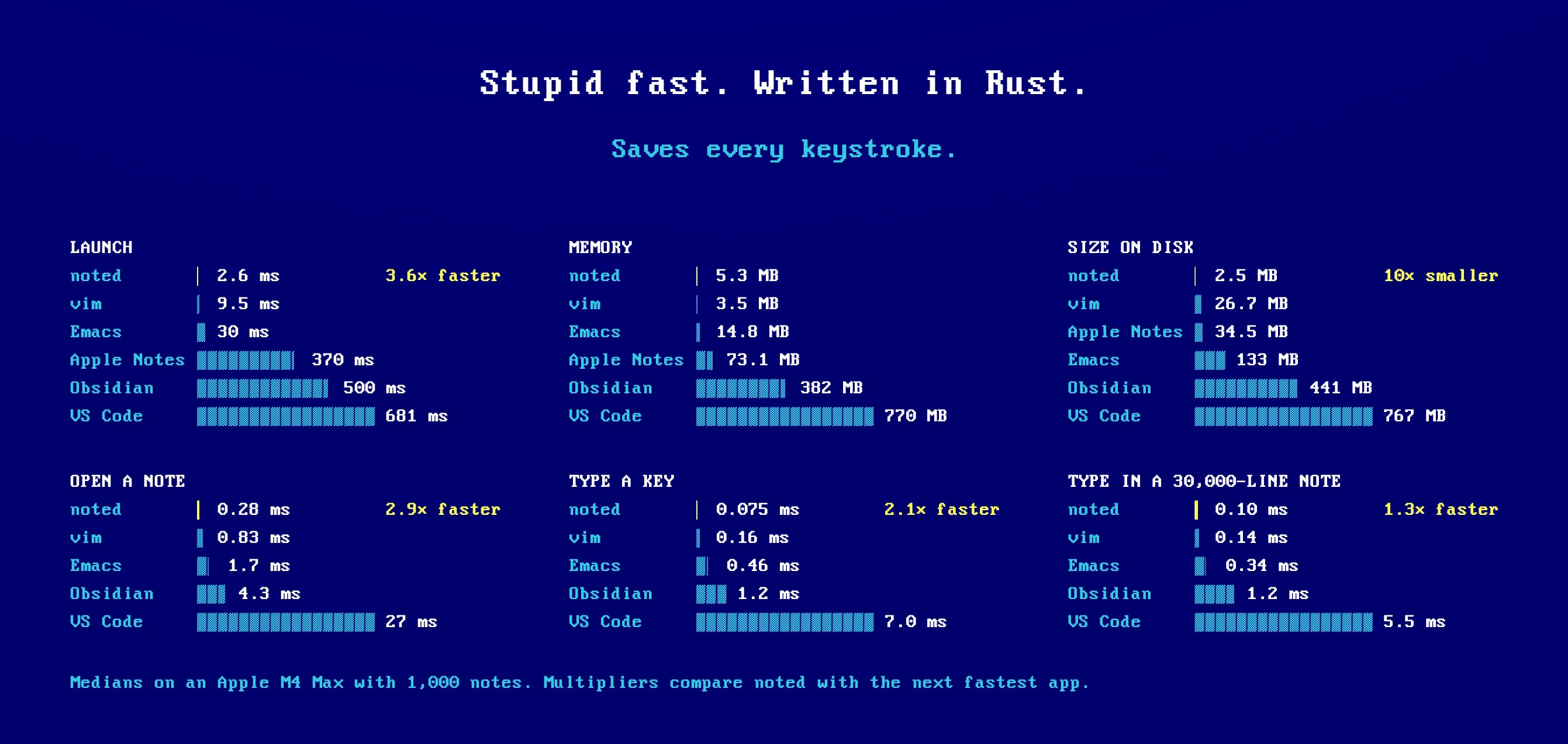
If the goal is capturing a thought before it slips away, speed matters, so I got a bit obsessed with it. Noted launches in 2.6ms, uses about 5MB of memory, and takes up roughly 2.5MB on disk.
With 1,000 notes on my machine, it opens faster than Vim, Emacs, Obsidian, and Apple Notes. These are tiny numbers on paper, but you feel the difference every time you reach for it.
Finding that one note
Writing notes quickly only helps if you can find them again. We’ve all lost time hunting for that one note we know we wrote somewhere.
Noted uses fuzzy search for when you only remember bits and pieces, and exact matching for when you know precisely what you’re looking for. Either way, results appear as you type.
The little interactions
My favorite part of any side project is obsessing over the small interactions. In Noted, that means checking off tasks, seeing your progress at a glance, and editing Markdown tables that automatically align text and numbers. Tables in particular have always been painful to edit by hand, and they shouldn’t be.
There are plenty of other small details like these waiting to be discovered.
And if your notes start to pile up, you can organize them into folders and arrange them however you like, without leaving the keyboard.
The actual 80s part
Then there’s the part that gives Noted its personality: DOS-style menus, Turbo blue and amber themes, a Synthwave theme for late nights, and optional keyboard sound effects I’m slightly addicted to.
It’s part nostalgia and part a belief that software can feel immediate and tactile again. That spirit carried over to the website, which was a lot of fun to build.
Give it a try
I’ve been using Noted every day for the past month, and it felt like the right time to share it. You can install it with npm on macOS, Linux, or Windows:
npm install -g @adrianmg/noted
There are also other ways to install it, including Homebrew, on noted.computer.
If you give it a try, I’d love to hear what you think, whether it’s an idea, a bug, or a weird edge case.
I hope you enjoy it as much as I do ❤️
This post was originally shared as a thread on X.